Preload
The preload browser hint can be used to fetch resources that are critical to the current navigation, such as fonts or images are instantly (not longer than 3 seconds after the initial load) visible on a landing page.
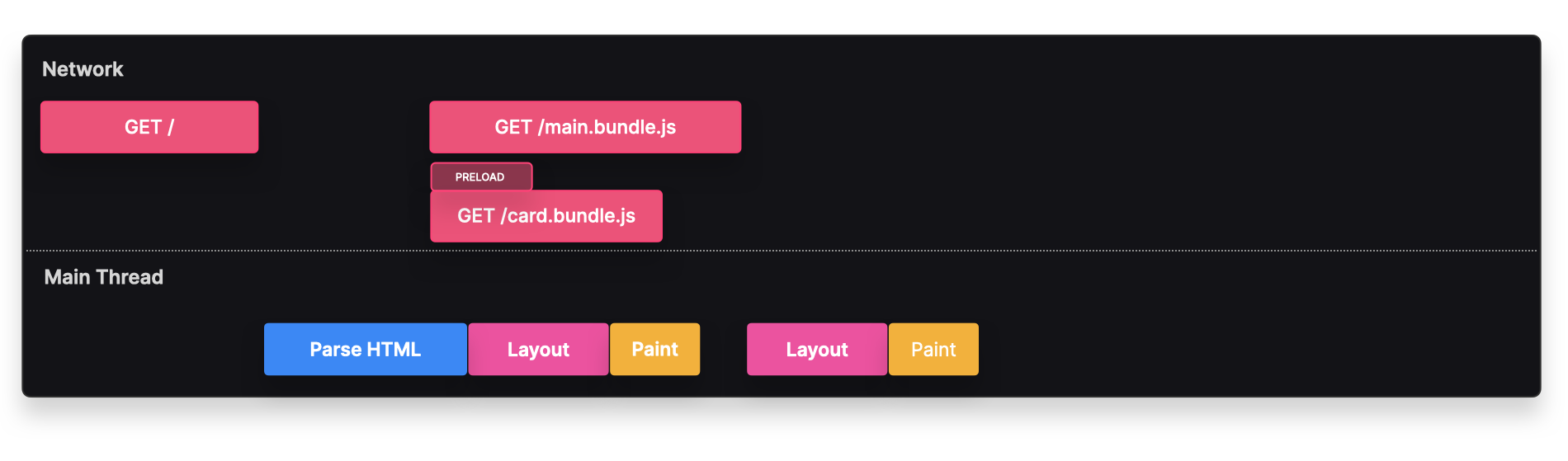
With prefetch, the browser would only actually prefetch the resource if the conditions were good enough to not negatively affect the user experience. Unlike a prefetch, a preloaded resource gets fetched no matter what.
For example, if we wanted to show the SearchFlyout instantly on the landing page, we can preload this resource to make sure the user won't have to wait too long before this resource is available.
The search-flyout.bundle.js bundle is fetched in parallel with the main.bundle.js. When the client actually needs to render the resource, which happens soon after the initial load, it can quickly retrieve it from the HTTP cache.
Implementation
We can preload a resource by explicitly adding it to the head of the html document.
<link rel="preload" href="./search-flyout.bundle.js" />
If you're using Webpack, you can preload it dynamically by using the /* webpackPreload: true */ magic comment.
const SearchFlyout = lazy(() => import(/* webpackPreload: true */ "./SearchFlyout"));
Tradeoffs
✅ Loading time: The browser can quickly load and render the component from cache, instead of having to make a request to the server.
✅ Layout shift: Preloading styles, fonts and images can reduce layout shift.
⚠️ Performance: Since preloaded assets will get fetched no matter what, it's important to only preload resources that are actually instantly necessary. In most cases, it's worth either
prefetching the resource, or if it's JavaScript, using ascriptwith anasyncordeferattribute.<link href="./script" rel="preload" /> <script rel="defer" src="./script" />
Backlinks