Prefetch
The prefetch browser hint can be used to fetch resources that may be needed some time soon, but not immediately on the initial load. This can be the case on subsequent requests or page navigations that a user is likely to make.
A prefetched resource is fetched when the browser is idle and has calculated that it's got enough bandwidth, after which it caches the prefetched resource. When the client actually needs the resource, it can easily get it from cache instead of having to make a request to the server.
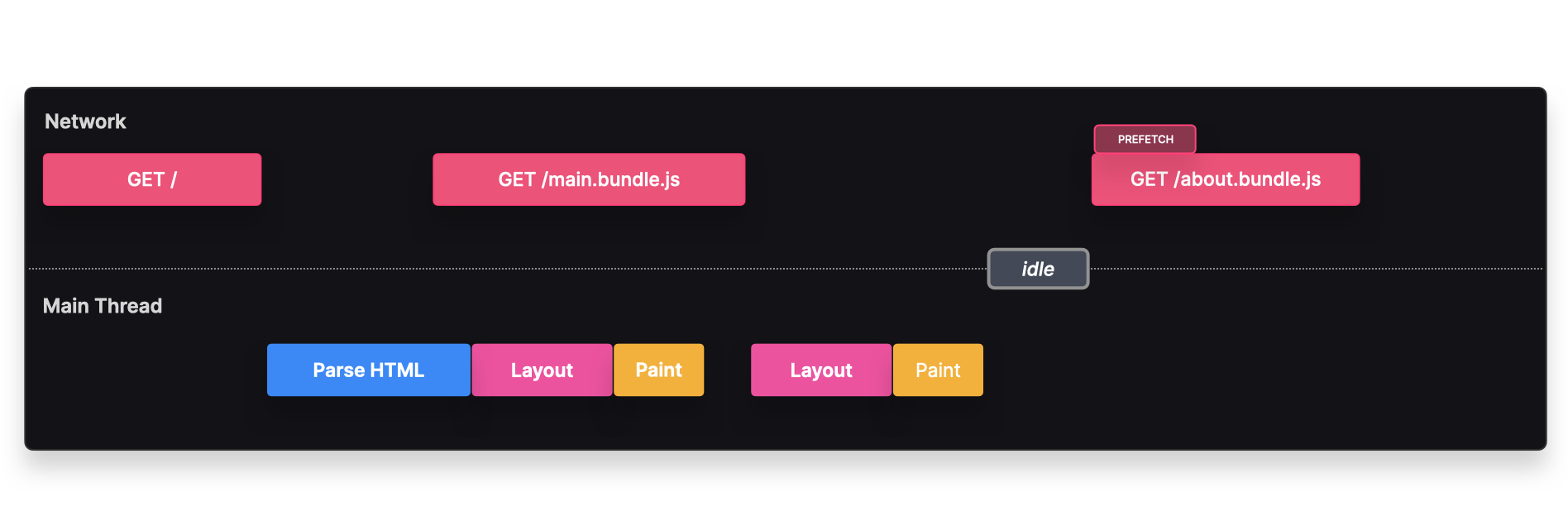
For example if we use route-based splitting, and we know that most users will navigate to the /about route, we can prefetch this route to get a faster navigation, resulting in a better UX.
Instead of waiting for a user interaction to fetch the about.bundle.js bundle, the browser prefetched this resource when it was idle. Once the user actually navigates to the /about page, the bundle can quickly load from cache instead of making a request to the server.
Implementation
We can prefetch a resource by explicitly adding it to the head of the html document.
<link rel="prefetch" href="./about.bundle.js" />
If you're using Webpack, you can prefetch it dynamically by using the /* webpackPrefetch: true */ magic comment.
const About = lazy(() => import(/* webpackPrefetch: true */ "./about"));
Tradeoffs
✅ Loading time: The browser can quickly load and render the component from cache, instead of having to make a request to the server.
⚠️ Unnecessary: If the user ended up never navigating to the
Aboutroute, we unnecessarily loaded the resource, which could negatively affect the app's performance and be costly to the user.
Backlinks